Zit Journal
Monitor Buying Guide: Which Screen Fits Your Nigerian Home?
Choosing a monitor depends on your desk, work, gaming habits and budget. Here is a practical comparison of the realistic options available in Zit’s Computer Monitors section.
Zit Journal
Choosing a monitor depends on your desk, work, gaming habits and budget. Here is a practical comparison of the realistic options available in Zit’s Computer Monitors section.
A monitor is the right choice when you need a proper screen for a desktop computer, laptop, console or gaming setup. For most Nigerian buyers, the best option is not the biggest or fastest model; it is the one that fits your desk, power arrangement, room conditions and actual use.
The Computer Monitors section currently spans ₦110,000 to ₦540,000 across its in-stock items. The products below show the practical spread: simple Full HD screens for office use, faster gaming monitors and large curved displays for buyers who want a more immersive setup.
Before comparing refresh rates, measure the space where the monitor will sit. A 24-inch or 27-inch screen is easier to place on a typical home or office desk, while a 34-inch curved display needs more room and becomes a more deliberate part of the setup.
Think about what you will do most. Documents, browsing, schoolwork and ordinary office tasks do not require the same type of screen as competitive gaming. If you are buying for a shared family desk or a compact apartment, paying for a very large curved model may leave you with less usable space rather than a better experience.
Also consider your power setup. In a home with unstable mains or generator changeover, a monitor should be connected carefully and protected as part of the computer setup. Keep the screen away from generator fumes, excessive heat and dusty areas, and remember that coastal humidity and harmattan dust can make a clean, sensible installation more important.
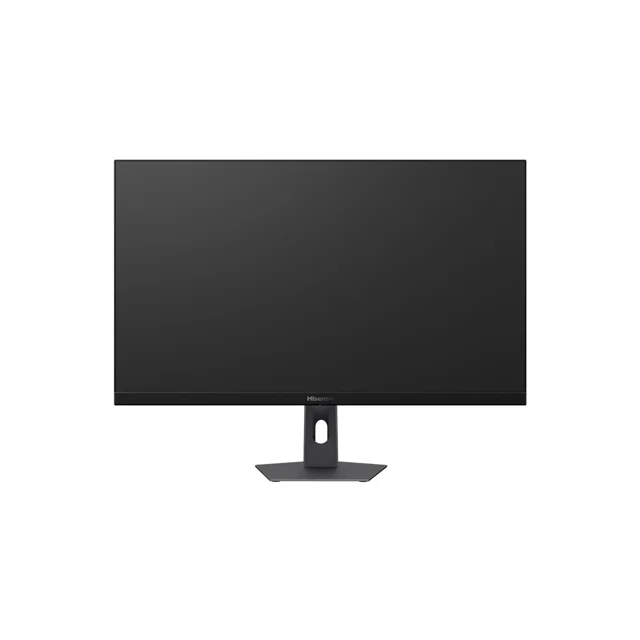
Pick the Hisense 24 Inches LCD Monitor | MON24N3Q if you want a compact, capable screen for work, study and everyday computer use. It costs ₦110,000 and has a 24-inch Full HD 1920 × 1080 IPS display, a 144Hz refresh rate and a 5ms response time. It also has HDMI and VGA connections, plus VESA compatibility for wall mounting.
This is the straightforward choice for a buyer who wants useful specifications without moving into a large gaming setup. Its 24-inch size is more suitable for a smaller desk, bedroom workspace or office table than the 34-inch alternatives. The HDMI and VGA ports also give you two connection options, but check which connection your computer actually uses before ordering.
The high refresh rate is more than many office buyers need, but it gives this model more flexibility than a basic screen. See the Hisense 24-inch monitor if space and price matter more to you than a wide or curved display.
Pick the Hisense 27 Inches Full HD LCD 1080p Monitor | HISMON27N3Q if your priority is a larger ordinary screen for home or office use. It costs ₦140,000 and is described as a 27-inch widescreen display for office and home use, with high-definition visual clarity and a wide viewing experience.
The main reason to choose this model over the 24-inch option is the larger viewing area. It can suit a buyer who reads, works with several windows or simply prefers a bigger screen, while still avoiding the cost and desk commitment of the curved 34-inch models.
This is also the clearest option for buyers who do not need gaming-focused features. If you are mainly buying for spreadsheets, documents, browsing, online learning or general home use, a simple 27-inch Full HD monitor is a more sensible purchase than paying for specifications you will not use.
Pick the Hisense 27 Inches 144Hz Monitor | MON27N3QPRO if you want a gaming-focused screen without moving to the expensive end of the range. It costs ₦160,000 and combines a 27-inch Full HD display with a 144Hz refresh rate, 7ms response time, Adaptive Sync and a low-blue-light mode. It has one DisplayPort, one HDMI port and one VGA port.
This is the balanced gaming choice in the sample. It is large enough for an engaging gaming desk but still more manageable than a 34-inch curved screen. Adaptive Sync and the 144Hz refresh rate make it more appropriate for a buyer who plays games regularly, while the eye-protection modes are useful if the screen will also be used for long work or study sessions.
Do not choose it simply because the number is higher than the ordinary 27-inch model. Choose it when gaming is a real part of your use. For office work alone, the extra gaming features are not the reason to spend more.
Pick the Hisense 27 Inches 240Hz Monitor | MON27G3Q if fast gaming is your main reason for buying. It costs ₦202,000 and has a Full HD resolution, a 240Hz refresh rate, a Fast IPS panel and a 90% DCI-P3 colour specification.
This model is aimed at the buyer who already knows they want a faster gaming display. It is still a 27-inch screen, so it avoids the space demands of the 34-inch options, but its purpose is clearly different from the basic home and office monitors.
For casual gaming, office work or films, do not assume 240Hz automatically makes it the best purchase. The right question is whether your computer and games will make meaningful use of that capability. If not, the 27-inch 144Hz model is the more restrained choice.
Pick the Hisense 27 Inches 320Hz LCD Monitor | MON27G6QPRO if you want the fastest 27-inch option in this comparison and your budget supports it. It costs ₦345,000 and offers QHD resolution at 2560 × 1440, a 320Hz refresh rate, a 1ms response time and HDR 400. It also includes FreeSync, two HDMI 2.0 ports, one DisplayPort and an audio connection.
This is not the sensible default for a normal office. It is the specialist choice for a buyer who wants both a sharper QHD image and very high refresh performance in a 27-inch format. The extra cost only makes sense if those features are central to your setup rather than attractive numbers on a product page.
Pick the Hisense 34 Inches Curved 200Hz Gaming Monitor | HISMON34G6Q if you want a wide gaming view and have the desk space for it. It costs ₦356,500 and has a 34-inch 1000R curved display, WQHD resolution of 3440 × 1440, a 200Hz refresh rate and a 1ms MPRT response time. It also includes built-in speakers, HDR 400, FreeSync, two HDMI 2.0 ports, DisplayPort and audio.
The 21:9 widescreen format makes this a different proposition from the 27-inch monitors. It is for the buyer building an immersive gaming or entertainment setup, not someone trying to fit a screen into a narrow work corner. Measure first, especially in a smaller apartment, and leave room for cable routing and airflow around the setup.
If you want the same broad curved format but a higher refresh rate, compare the Hisense 34-inch 240Hz curved monitor. It costs ₦402,500 and keeps the 34-inch 1000R curved format, WQHD resolution, 1ms MPRT response time, built-in speakers, HDR 400 and FreeSync while increasing the listed refresh rate to 240Hz.
Pick the Hisense 34 Inches 180Hz Curved Monitor | His34G6K-PRO if you want a large WQHD curved display but prefer its listed connection layout. It costs ₦425,500 and has a 34-inch VA/ELED display, 3440 × 1440p WQHD resolution, 180Hz refresh rate, 1ms MPRT response time, 400-nit brightness, two HDMI connections, one DisplayPort and one audio connection.
Its refresh rate is lower than the two 200Hz and 240Hz Hisense curved options listed above, so it is not the obvious pick for a buyer chasing the highest number. Consider it when the stated brightness and connectivity fit your setup better, and when you have already decided that a large curved screen is worth the desk space.
Pick the Samsung Odyssey G9 32 Inches Curved Smart Monitor if you specifically want the Samsung option and are comfortable spending at the top of this sample. It costs ₦540,000 and is described as a 32-inch curved smart monitor with 1000R curvature, designed for immersive gaming and smooth visuals.
This is the least sensible choice for a basic office or study desk because it sits at the top of the listed price range and its appeal is the curved, immersive format. It makes more sense for a buyer deliberately building a premium gaming or entertainment space. View the Samsung Odyssey G9 listing and confirm the current product details before deciding.
A desk monitor normally needs careful placement, the correct video cable and a nearby power connection. If you are wall-mounting a compatible model, use a qualified installer and confirm the mounting hardware before making the purchase. The Hisense 24-inch model is the one in this comparison specifically listed with VESA compatibility.
Plan the setup around mains and generator changeover rather than hiding the monitor behind a pile of cables. Keep vents and ports clear, avoid damp areas near the coast, and clean harmattan dust from the surrounding area with suitable care. Installation and mounting charges are not stated in this guide, so ask the seller or installer for the exact cost before work begins.
The prices quoted here are the ones listed on the product pages at the time of writing. Prices can change, so the linked product page always shows the current figure.
Ready to compare the full range? Browse all Computer Monitors on Zit before choosing the screen that fits your desk and use.
No comments yet. Be the first to share your thoughts!
Sign in to leave a comment and engage with the community.
Chat with us on WhatsApp!
Loading…